ClerkSafe

The clerk that never leaves the office

A banker's box of PDFs.
One organized matter.

Point ClerkSafe at a folder of case documents. It renames and files them, summarizes each in plain English, builds a date-ordered chronology, and pulls every deadline it finds into a calendar you can import — entirely on your own machine.

Windows & macOS · runs offline · one-time $299 · first 3 matters free

Doe v. Roe — No. 2026-CV-01234 on-device
8 documents found — ready
scan0093.pdf2025-04-12_Doe-v-Roe_Complaint.pdf2025-04-12
IMG_4471.jpg2025-06-02_Doe-v-Roe_Police-Report.jpg2025-06-02
FINAL_v2 USE THIS.docx2026-03-01_Doe-v-Roe_Answer.docx2026-03-01
fax_20260612.pdf2026-06-12_Doe-v-Roe_Correspondence.pdf2026-06-12
Doc1 (3).pdf2026-07-31_Doe-v-Roe_Discovery.pdfdeadline2026-07-31
Untitled.docx2026-08-20_Doe-v-Roe_Motion.docxdeadline2026-08-20
notice.pdf2026-09-15_Doe-v-Roe_Notice-of-Hearing.pdfdeadline2026-09-15
SKM_C3350.pdf2027-04-12_Doe-v-Roe_Order.pdf2027-04-12
0
documents
0
dated events
0
deadlines
Next deadline
Response due
2026-08-20 · Motion.docx
Summary
Plain English
every document, editable

Illustration of a ClerkSafe run — file names from a sample matter.

See the actual software

Not a mockup — the real thing.

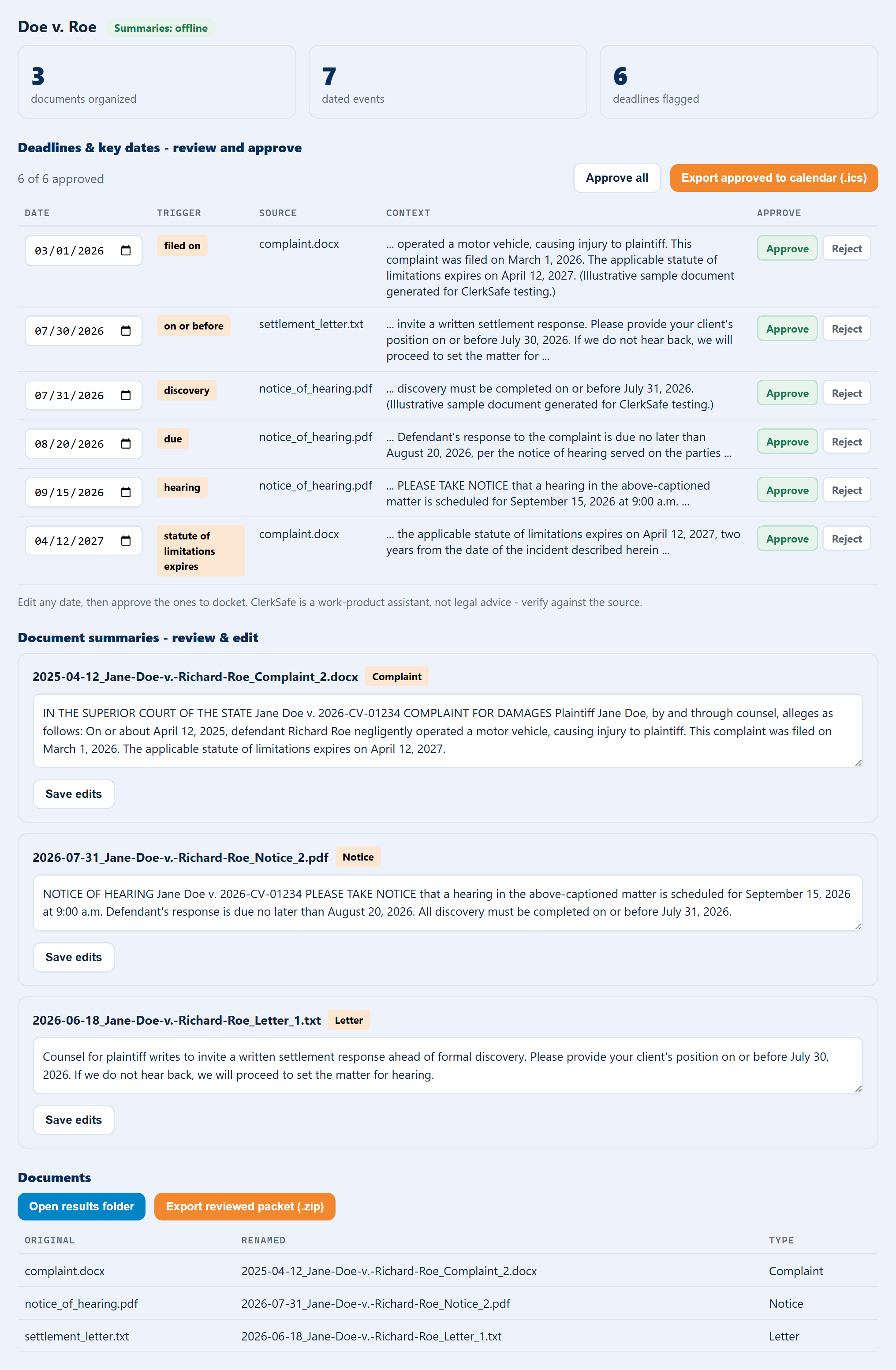
The illustration above is the idea. This is ClerkSafe itself, after a real run on a sample matter: every deadline it found, with the exact source text it came from, ready to review, edit, approve, and export to your calendar — all processed on your own machine.

ClerkSafe — Doe v. Roe · No. 2026-CV-01234 on-device
ClerkSafe after organizing a sample matter: 3 documents organized, 7 dated events, 6 deadlines flagged — a reviewable deadlines table with dates, triggers, source files and extracted context, plus editable plain-English document summaries.

Actual ClerkSafe output on a sample matter — deadlines and plain-English summaries, nothing uploaded.

0
Documents uploaded, ever
100%
Runs on your own machine
3
Formats read, including scans
$299
One time. No subscription, ever.
Why on-device matters

Your client files are yours.

ClerkSafe does its work on your machine. Not in a data centre, not in someone's training set, not behind a login you don't control.

It works with the Wi-Fi off

On a plane, in a courthouse basement, on a hotel connection you'd never trust. There's nothing to connect to.

No account, no login

You never create a profile. We can't see your matters, your clients, or your calendar — there's no mechanism by which we could.

No third-party disclosure

ABA Formal Opinion 512's consent requirement is triggered by putting client information into a third-party AI tool. ClerkSafe never does — so that question is removed entirely. You still own competence and verification: ClerkSafe drafts a first pass, you confirm it.

There's no server to breach, because there's no server.

On-device by architecture — not by policy
The honest comparison

But couldn't I just paste it into ChatGPT?

You could. For plenty of legal work it's genuinely useful. The problem isn't the quality of the answer — it's what happens to the document on the way there.

 Pasting into a cloud AIClerkSafe
Where the document goes Uploaded to a third party Stays in the folder
Client consent questionRaised by ABA Formal Op. 512Removed entirely
Works offline No Always
Renames & files the documentsYou do it, by handDone for you
CostPer seat, per month, forever$299 once
Pricing

Buy it once. Cover the whole office.

Firm licences are flat, not per-seat — because the person who'll use this most is often your paralegal, and you shouldn't have to decide whether they're worth a seat.

LicenceCoversOne-time
Solo1 person$299
Small firmup to 3 people$699
Firmup to 6 people$1,149
Officeup to 12 people$1,799
Siteone firm, unlimited people$2,999

Your first 3 matters are free on every licence. Windows & macOS. No subscription, no per-user charge, no renewal — you keep the software you paid for.

From the blog

Guides for the modern solo practice

Read all articles →
Straight answers

Frequently asked questions

Does anything get uploaded?

No. ClerkSafe reads and writes files on your own machine. There's no account, no sync, and no server component — it runs with the Wi-Fi switched off.

Does it calculate deadlines from court rules?

No, and that's deliberate. ClerkSafe finds and flags dates that appear in your documents and lets you review, edit, and approve them before they go to your calendar. It does not compute deadlines from jurisdictional rules, and it isn't a substitute for your own docketing judgment.

What file types can it read?

PDF, Word (.docx), and plain text. Scanned or image-only PDFs are read with on-device OCR, so faxes and scans work too — they just take a little longer.

Is it a subscription?

No. ClerkSafe is a one-time purchase — $299 for a solo licence, and your first three matters are free. Firm licences are flat rather than per-seat, so everyone in the band is covered, including your paralegal and assistants. No monthly fee, no renewal, no per-user charge.

Is this legal advice?

No. ClerkSafe is a work-product assistant. It drafts a first pass and flags dates; you review and verify everything, exactly as you would with a new clerk.

Be a founding user. Your first 3 matters, free.

Join the early-access list — we'll send you ClerkSafe and a quick-start guide. No card, no subscription.

No card required · Windows & macOS · one-time $299 after your first 3 matters